Google Business Profile for Dentists | What’s There to Know in 2026?

Dental SEO
27 April
Last updated: 26 May
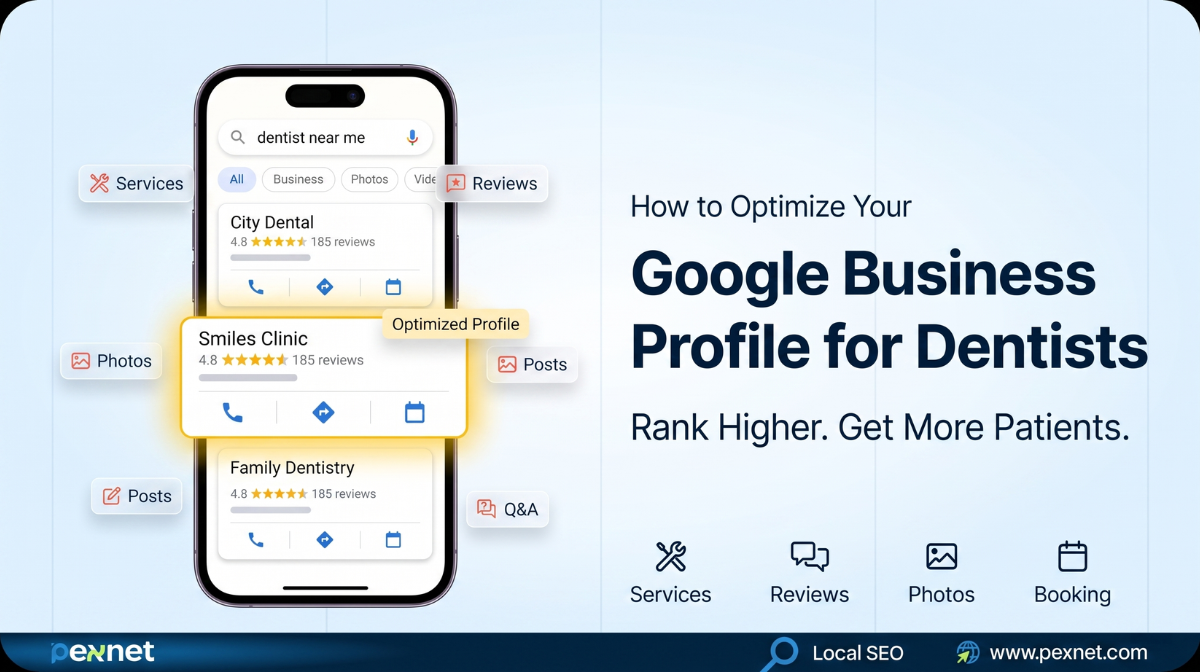
When a patient Googles “dentist near me”, the first thing they see is a map with three dental clinics – the Local 3-Pack. If your clinic isn’t in it, you’re invisible to the majority of patients searching for care in your area.
Your Google Business Profile (GBP), formerly known as Google My Business, is what determines whether your clinic will appear in those results. That means the importance of Google Business Profile for dentists can’t be overstated.
We created this guide to show how to optimize your Google Business Profile the most effective way – whether you run a solo practice or manage multiple locations.
Local SEO Impact of Google Business Profile for Dentists
According to Google, 76% of local searchers call or visit a business within 24 hours of finding it. Optimized dental profiles are up to 70% more likely to attract new patients. And unlike paid ads, GBP visibility is free. All it requires is consistent effort from your end.
Google usually uses three core signals to determine who ranks in the Local 3-Pack:
- Relevance: How well your profile matches what the patient is searching for
- Distance: How close your clinic is to the searcher
- Prominence: How well-established and trusted your practice is online (reviews, activity, citations)
If you think about it, you’ll realize you can’t control distance among these factors. But what about relevance and prominence?
Yes, they are within your hands. Here’s how to go about it.
How Dentists Should Optimize Their Google Business Profile
Step 1: Claim, Verify, & Complete the Foundations
Claim & Verify Your Profile
If you haven’t claimed your GBP listing yet, go to business.google.com, search for your practice name, and click “Claim this business.”
If it doesn’t appear, create a new one. Google will verify your listing via postcard, phone call, email, or video verification.
We recommend that you complete this within the first week because unverified profiles almost never appear in local search results, no matter how well-optimized they are.
But what if someone else has already claimed your listing? This is actually common for practices that have been around a while.
Well, you can request your ownership through Google’s official process.
Note: Never create a duplicate profile since it confuses both Google and patients.
Maintain NAP Consistency
NAP stands for Name, Address, and Phone Number. This vital information should be the same till the last character throughout your GBP, website, and every other directory listing (Healthgrades, Zocdoc, Yelp, etc.).
Unfortunately, it’s common for dentists to make mistakes here. For instance, your GBP says “Maple Grove Dental Studio” while your website says “Maple Grove Dental Care.” That inconsistency will literally kill your ranking potentials.
Another example is your phone number. Take a look at these two:
- (310) 555-0176
- 310-555-0176
Even minor changes in these brackets and hyphens are enough to hurt your SEO.
Choose the Right Categories
Your primary category informs Google of what your practice is most relevant for. You’ve to be super specific here:
| Primary Category | Best For |
| Dentist | General dental practice |
| Cosmetic Dentist | Smile makeovers, veneers, whitening |
| Pediatric Dentist | Child-focused care |
| Orthodontist | Braces, Invisalign |
| Emergency Dental Service | Same-day and walk-in care |
Then add the secondary categories to expand your search visibility.
A general dentist who also offers implants and teeth whitening should add those as secondary categories.
Remember, each one is a new opportunity to appear in relevant searches.
Write a Compelling Business Description
The business description section provides vital information on who you are, whom you serve, and what you aim to achieve.
You have just 750 characters to describe all that, so use them strategically.
Don’t just list services. Explain what makes your practice different and who you serve best.
Include your primary keyword naturally {“dental clinic in (city)”} and mention your most in-demand services.
Here’s a good example:
“At Riverside Smiles Dental, we provide comprehensive dental care for families and adults across (City). From routine cleanings and fillings to dental implants, Invisalign, and teeth whitening, our experienced team is committed to making every visit comfortable and stress-free. We’re accepting new patients with flexible payment options.“
These keywords naturally show what you’re known for. They also help strengthen your local SEO at the same time.
Step 2: Optimize Your Services Section
The Services section lets you list all the treatments and procedures your clinic offers. Google uses this info to match your profile against specific searches.
So, a patient searching “root canal near me” is far more likely to find you if root canal treatment is explicitly listed in your services section.
Add Both Predefined and Custom Services
Google provides a library of predefined dental services. Select every one that applies to your practice:
- Teeth Whitening
- Dental Cleaning
- Root Canal
- Dental Fillings
- Tooth Extraction
- Dental Crowns
- Dental Implants
- Braces / Orthodontics
For services that aren’t included in Google’s predefined list, you can add them as custom services, such as:
- Invisalign Consultation
- Veneers
- Sedation Dentistry
- Emergency Dental Care
- Gum Treatment / Periodontal Therapy
- Pediatric Dentistry
- Smile Makeover
- TMJ Treatment
Write Patient-Friendly Service Descriptions
Each service allows you to write a short description (up to 300 characters). Don’t waste this space with generic text like “We offer teeth whitening services.” Instead, write the way patients think and search.
Take a look at this example:
Weak: Teeth whitening services available.
Strong: Professional teeth whitening that brightens your smile by 5-8 shades in a single visit. Safe, effective, and completed in under 90 minutes. Ideal for special occasions or everyday confidence.
The latter mentions the outcome, sets expectations, and addresses common concerns – all of which helps build confidence before a patient decides to pick up the phone.
Align Services with Your Website
Your GBP services should mirror the service pages on your website.
For example, if your website has a dedicated page for dental implants, your GBP should list dental implants, and the description should use consistent language.
You need to maintain this relevance as part of your dental SEO so Google can understand your business better.
Step 3: Upload Photos to Build Trust
Patients usually want to take a look at the team, interiors, equipment, and before-and-after images to decide whether a practice feels right for them.
5 Essential Photo Categories
Upload at least 10 photos when starting out, and try to add new photos every month.
Here’s what to prioritize:
1. Exterior Photos (minimum 3)
- Front of your clinic from the street
- Parking area
- Signage and entrance
They help people recognize your clinic when they arrive for the first time. Google specifically recommends at least three exterior shots.
2. Interior Photos (minimum 3)
- Reception and waiting area
- Treatment rooms
- Any comfort features (massage chairs, TVs, etc.)
Since patients are usually anxious about dental visits, interior images showing a clean, welcoming environment help reduce that anxiety.
3. Team Photos
- Individual dentist headshots
- Full team photos
- Staff at work (without patients in frame, unless consent is documented)
Naturally, people choose a dentist they can really trust. For that reason, we always recommend showing real profiles rather than stock photos and generic descriptions.
4. Equipment and Technology Photos
- Digital X-ray systems
- CAD/CAM technology
- Intraoral cameras
- Any advanced equipment your clinic uses
This is a great way to position your practice as professional and up to date.
5. Before and After Photos
Avoid harsh flash photography and use natural lighting wherever possible:
- Smile transformations (veneers, whitening, Invisalign)
- Always obtain written patient consent before publishing
- Never include patient names or details in captions (this is a HIPAA compliance requirement)
Here are some tips to follow:
- Keep Images clean and uncluttered
- Name your image files descriptively{dental-clinic-reception-(city).jpg rather than IMG_4832.jpg}
- Add location data (geo-tagging) to your photos if possible to help increase its local relevance
- Keep your GBP updated after any renovation work or rebranding
- Do not use stock photos because they cause trust issues
- Real photos of your actual space and team will always outperform generic images
Step 4: Use Google Posts Like a Marketing Channel
Google Posts appear directly in your GBP listing whenever patients are actively searching for
dental care.
The best part is unlike social media where your post competes with everything else in a feed, a Google Post reaches patients at the exact moment they’re considering your clinic.
5 Types of Posts to Publish
- Promotional Posts
Highlight your limited-time offers or special pricing here. They are especially effective for high-intent services. For example:
“Free consultation for dental implants this month. Limited appointments available, call to book.”
- Service Spotlight Posts
Introduce a specific treatment, especially newer or lesser-known services:
“Now offering Invisalign at our (City) clinic. Straighten your teeth without metal braces. Book your free assessment today.”
- Educational Posts
Show your expertise this way:
“Did you know? Gum disease is the leading cause of tooth loss in adults, but it’s almost entirely preventable with regular cleanings. Book yours today.”
- Seasonal and Holiday Posts
Update the audience on holiday hours, seasonal promotions, or oral health reminders tied to relevant times of year (back to school, Christmas, New Year’s resolutions).
- Team Spotlights
Make your practice more personal:
“Meet Dr. (Name), our cosmetic dentist with over 12 years of experience transforming smiles. She’s now accepting new patients.”
How Often to Post?
Our recommendation is at least once a week. You can also post more in promotion-heavy months.
Every post should include:
- A clear, specific message
- A strong call-to-action button (Book, Call, Learn More)
- A real image
Note: Google Posts expire after 7 days unless they’re event-type posts, so consistency is essential.
Step 5: Build & Manage Your Reviews
Reviews are one of the most important local ranking factors. They determine not just where you rank, but whether people might choose you over a competitor who also has the same rankings.
How to Get More Reviews Consistently
The best time to ask for a review is immediately after a positive appointment, while the experience is still fresh.
Follow this guide:
- Let your front desk staff verbally ask the satisfied patients before they leave: “We’d really appreciate it if you left us a Google review, it only takes 60 seconds.”
- Send an automated follow-up SMS or email within 2 hours with a direct link to your GBP review page
- Place a QR code that links directly to your review page in your waiting room and on appointment reminders
Note: Never offer incentives like discounts, gifts, or free services in exchange for reviews. This violates Google’s policies and could suspend your precious profile.
How to Respond to Reviews?
Respond to every review right on time – positive and negative. Not only does it represent good customer service, but it also indicates that your profile is well-managed and engaged.
For positive reviews, thank the patient, acknowledge something specific they mentioned, and invite them back.
For negative reviews, respond within 24-48 hours. Stay calm, empathetic, and professional.
Acknowledge their concern, apologize for the experience, and invite them to contact you privately to resolve the issue.
Never get defensive or reference specific treatment details (this is also a HIPAA compliance requirement).
Step 6: Activate the Q&A Section
Patients use it to ask questions before they commit to calling. That means you might lose leads if their questions go unanswered.
Here’s an important factor: anyone can post questions and anyone can answer them here, including your competitors or misinformed patients. So, you need to actively monitor this section.
Proactively Seed Your Own Questions
Here’s what we recommend: Don’t wait for people to ask. Post the most common and important questions yourself and answer them, such as:
- Do you accept new patients?
- What insurance plans do you accept?
- Do you offer payment plans or financing?
- Do you see children?
- Is parking available?
- Do you offer same-day emergency appointments?
- How long does a teeth whitening treatment take?
Step 7: Use Attributes, Booking Links, & Additional Features
Attributes
Attributes are short descriptors that help patients quickly understand if your practice is a good fit.
Depending on your category, you may have access to attributes like:
- Accepting New Patients
- Accessible Entrance
- Free Consultation
- Online Appointments
- LGBTQ+ Friendly
- Wheelchair Accessible
Fill in every attribute that applies. They can convince patients with specific needs to choose you.
Add a Direct Booking Link
Add an appointment booking URL to your profile. It makes it easier to go from search to booking in a single click. What’s more, Google also treats that as a positive engagement signal.
Note: Link directly to your booking page, not your homepage.
Enable Messaging
Google allows patients to send messages directly to your practice through your profile.
Don’t forget to enable this feature. If necessary, let someone monitor and respond as fast as possible.
In fact, you could get a warning if you’ve slow response times.
Step 8: Maintain a Consistent Optimization Routine
Consistency is key. You’ve to keep it all year round to reap its benefits.
Here’s what you can do:
Weekly:
- Publish 1-2 Google Posts with CTAs
- Respond to all new reviews within 48 hours
- Answer any new Q&A questions
Quarterly:
- Audit all profile information (hours, services, categories, description)
- Update holiday hours in advance
- Benchmark against top local competitors, check their services, photos, and review velocity, then identify any gaps in your own profile
Monthly:
Add 3–5 new photos
- Review and update services or descriptions
- Check NAP consistency on all directories
- Review GBP Insights and adjust your posting strategy
Final Thoughts
There’s a lot to gain from Google Business Profile for dentists – if done right. From building your credibility to earning the top spot on search results to getting more patients, you should take good care of your GBP regularly.
Did you know that dental clinics that’re dominating the local 3-pack but aren’t the biggest or the most experienced? They’re the ones who treat their GBP as a living, active marketing channel.
However, if managing all of this feels overwhelming to you while also running a practice, Pexnet has seasoned GBP specialists for dentists who can help professionally.
Feel free to get in touch with us for a free audit of your Google Business Profile and a clear action plan to start ranking in your area.
FAQs
What should be included in the GBP description to improve visibility?
Ensure NAP consistency, relevant services, location, and other critical information that showcase your dental practice. But be aware not to stuff unnecessary keywords. Remember, you can only write a very short description (~750 characters), so use it wisely.
How do you handle negative reviews on Google?
Reply to and address every negative and positive review professionally. Do not lash out at any negative reviews. Make sure you portray a compassionate, empathetic image. Show that you care for the patients and their negative experiences. Also, make sure to resolve the issue if possible.
Do I have to pay money to optimize my GBP?
No, Google Business Profiles are completely free, and you don’t have to pay anything. The ranking depends on your credibility, trust signals, and experience. To optimize your GBP components and start ranking in the Map Pack.
How can I get quality leads by optimizing my GBP?
If you have successfully outranked your competitor and ranked in the top 3 map pack search results for relevant queries, you will start getting organic leads. However, these leads won’t guarantee sales.
How often do we have to post on GBP?
Post regularly with real-life data and trackable results. These posts act as your digital billboard, showcasing your service to the world.

Md Riadul Islam
Carpet Cleaning SEO Specialist
With over 10 years of experience, Riadul is passionate about helping local, independent businesses succeed.
He’s now focused on AI’s impacts on niche websites since aside from Google, people are also using different AI platforms for carpet cleaning services.
He found that while Google cares about content relevance and website authority, AI relies more on trust and credibility to determine recommendations. That’s why he prioritises strengthening trust signals for our clients.
Riadul believes that sustainable growth comes from combining strong branding, deep customer trust, and smart SEO approaches. At Pexnet, he shares the strategies, frameworks, and real-world lessons he has refined over a decade.
Get Quality Leads from Us
PexNet Newsletter - Subscribe for SEO news, trends, updates, & more.
Share this job post


Related Posts

We’re All Ears!
A simple, open conversation can create new doorways to your professional and business success. Don’t hesitate. Take the first step right now.