Content Strategy for Law Firm SEO | What Works in 2026?

Law Firm SEO
11 May

Right now, someone in your city is searching for an attorney. They must be in an emergency, scared, and about to call whichever firm shows up first.
If that firm is not yours, you just lost a case that might be worth somewhere between $5,000 and $500,000.
Neither you nor us want that to happen to you anymore.
Today, we’ll focus on the content part of your local SEO strategy in detail.
By the time you finish, you will know:
- Why people in your city cannot find you yet
- The exact pages your website is missing right now
- How to write each page so it ranks and books consultations
- How to compete with Avvo, Find Law, and other directories
- How to show up in Google’s AI answers
- What to do every week to keep growing
2026’s Content Strategy for Law Firms
Step 1: Understand How Your Future Clients Search
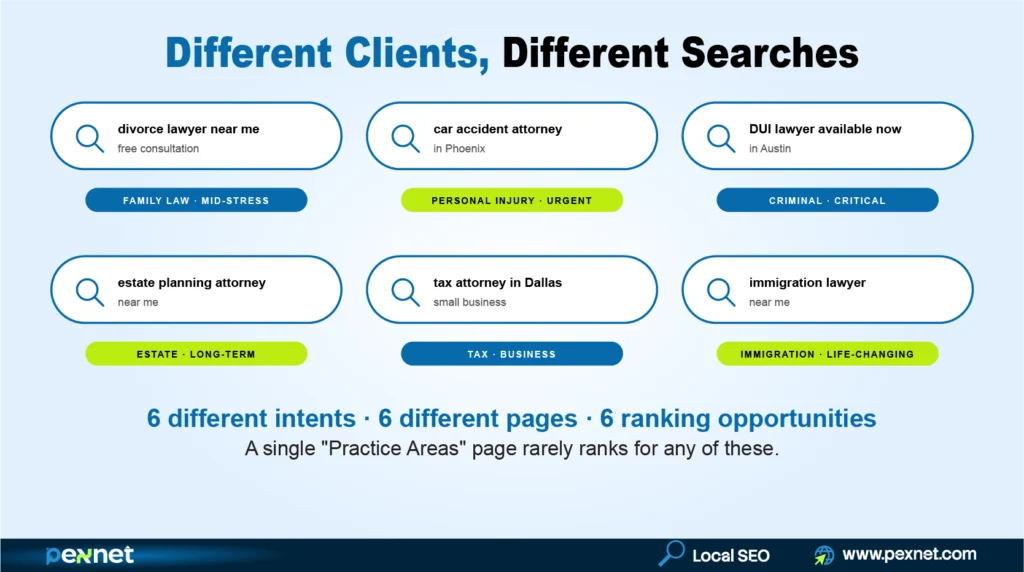
Before you build any new page or publish any blog, you need to understand how potential clients Google legal help.
It’s obvious people do not visit a law firm website casually. They search because something important has happened. They may be facing divorce papers, a criminal charge, an accident injury, an immigration issue, a tax problem, or the need to protect their family with an estate plan.
Each situation creates a different search behavior. For instance:
- Someone dealing with a divorce may search for: “divorce lawyer near me free consultation”
- Someone injured in a car accident may search for: “car accident attorney in [city]”
- A person arrested for DUI may search for: “DUI lawyer available now in [city]”
- A family planning for the future may search for: “estate planning attorney near me”
- A business owner with a tax issue may search for: “tax attorney in [city]”
- A family facing an immigration concern may search for: “immigration lawyer near me”
A homepage can introduce your law firm, but it’s not enough to rank for every legal service you offer. If your firm handles divorce, DUI defense, personal injury, estate planning, immigration, and tax law, each of these services needs its own dedicated page.
Google wants to show the most relevant page for every search. So, when someone Googles “car accident attorney in [city],” a detailed car accident page has a much better chance of ranking than a general “Practice Areas” page.
This is the foundation of content strategy for law firms.
Your website should clearly answer three things:
- What legal services do you offer?
- Which cities or areas do you serve?
- Why should someone trust your firm with this specific legal problem?
When your content answers those questions clearly, every page becomes a possible entry point for a new client.
Step 2: Audit Your Website & See What You Have Now
Before building anything new, you need to know what already exists. This will take 30 minutes and save you weeks of wasted work.
Open your law firm website and write down:
- How many practice area pages do you have?
- Do you have one page per city you serve? Or just one “about us” page that mentions a few cities?
- Does each attorney at your firm have their own bio page?
- How many real blog posts do you have, and do they answer actual client questions?
- When you Google your firm name plus your city, do you appear on page one?
Over the years, we’ve seen these common issues come up in most cases:
- One services page that lists everything,
- No city-specific pages,
- Weak attorney bios, and
- Either zero or very generic blogs.
If that’s your situation, no need to worry because almost every firm starts here. Keep following this guide and you’ll be fine.
Step 3: Build Your Keyword Architecture
Remember, generic keyword research is a trap.
A term like “lawyer in Phoenix” may look valuable, but most of those searchers are still comparing options. So, they’re not ready to hire yet.
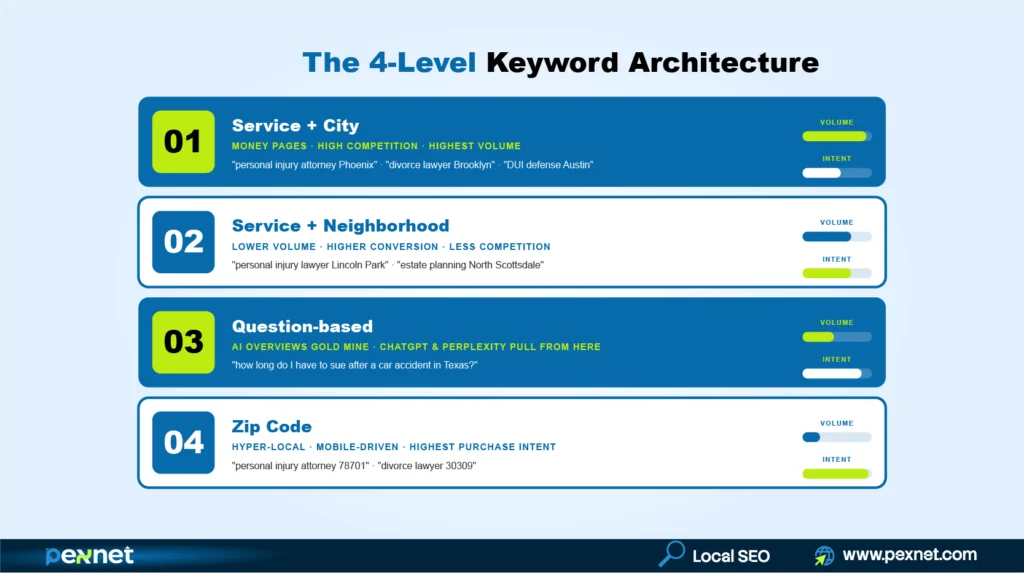
The real value lives in specific, intent-rich phrases that your firm books cases from. A solid keyword architecture maps four levels of search intent.
Level 1: Service Plus City
These are your money pages with the keywords that drive most of your signed cases.
Some examples are: “personal injury attorney Phoenix,” “divorce lawyer Brooklyn,” “DUI defense attorney Austin,” “estate planning attorney Dallas.”
Every practice area you offer plus every city you serve gets one of these.
Level 2: Service Plus Neighborhood
These keywords have a lower search volume but a higher conversion rate and far less competition.
Those who type “personal injury lawyer Lincoln Park” or “estate planning attorney North Scottsdale” are usually closer to hiring than someone searching the broader city term.
Since big firms ignore these, smaller firms can try to dominate them.
Level 3: Question-Based Keywords
These are the questions real clients ask Google before they pick up the phone. For instance:
“How long do I have to sue after a car accident in Texas?”, “Do I need a lawyer for a fender bender?”, or “What happens if I miss my court date in Arizona?”
Note: These keywords are also where AI Overviews and ChatGPT pull their answers from. So, they double as your AI visibility play (We’ve covered this more in Step 8).
Level 4: Zip Code Keywords
Some clients search by zip code, especially on mobile when they are physically nearby.
They’re worth including on city pages and inside your Google Business Profile (GBP) service area, even if they are low volume. For instance: “personal injury attorney 78701” or “divorce lawyer 30309.”
Don’t try to chase every keyword you find. Try to map each one to a specific page, a specific intent, and a specific conversion action.
A money keyword goes on a money page (your practice area + city page). A question keyword goes on a blog post or an FAQ.
Once you have this map, every other step becomes easier because you know exactly which pages to build, what each page should target, and what every blog post needs to answer.
Step 4: List Every Practice Area & Every City You Serve
The audit in step 2 has informed you of what people search for. Now’s the time to turn that into your build list.
Open Google Sheets or Excel and create two columns.
- Column 1: Practice Areas
List every type of case your firm handles. Be specific. Do not write just “personal injury.” Write:
- Car accidents
- Truck accidents
- Slip and fall
- Wrongful death
- Medical malpractice
If your firm handles a few categories, list every single sub-service under each one. But don’t group them.
- Column 2: Cities & Towns
List every city, suburb, and town where you already have clients or want to have clients. Then include your main office city plus every neighboring town within driving distance.
If you have 6 practice areas and 8 cities, you eventually need around 14 main pages, plus more cluster pages around them.
Yes, that sounds like a lot. But you’ll build them one at a time over months.
Step 5: Build One Practice Area Page Per Service
Here’s the rule of thumb: “One page for one service.”
Instead of one page called “Practice Areas,” you need separate pages:
- /personal-injury-attorney-[city]
- /car-accident-lawyer-[city]
- /dui-defense-attorney-[city]
- /divorce-lawyer-[city]
- /estate-planning-lawyer-[city]
- And so on
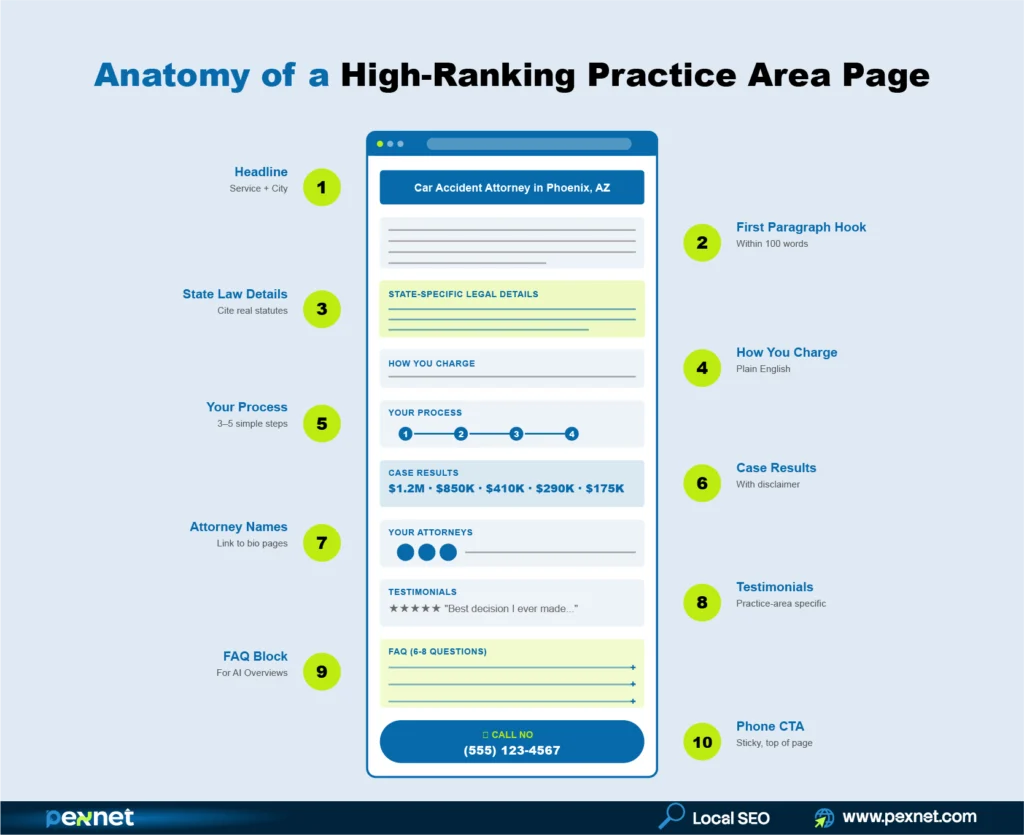
Now, what goes on each of these pages? Here is the exact structure that works.
What Every Practice Area Page Must Have (In Order)
1. The Headline at the Top of the Page
Use your service plus your city, such as “Car Accident Attorney in Phoenix, AZ.”
Do not use “Our Services” or “What We Do” because those headlines do not match what people search for.
2. The First Paragraph (Within 100 Words)
Speak directly to the reader and acknowledge their situation. Tell them what your firm does and where you do it. Three sentences are enough here.
3. Information Specific to Your State’s Laws
This is the secret weapon! A page that explains your state’s laws ranks far better than a page that talks generally about “personal injury.”
For example:
- A Texas personal injury page mentions the 2-year statute of limitations under Texas Civil Practice and Remedies Code Section 16.003 and the modified comparative fault rule
- A California divorce page mentions the 6-month residency requirement and California’s community property rules
- A Florida estate planning page mentions the homestead exemption and Florida’s specific probate requirements
You do not need to write a law school textbook. Just include the real laws and deadlines that apply to your state. This proves to Google and to your reader that you really practice law there.
4. How You Charge
For personal injury firms, it’d be like this:
“You pay nothing unless we win your case. Our fee is a percentage of your settlement, agreed upfront.”
For family law firms, explain your retainer and hourly rate clearly. Or, for criminal defense, explain your flat fee structure.
Whatever your model is, write it in plain English. This single paragraph removes the biggest reason people hesitate to call.
5. Your Process (Explained Simply)
Walk the reader through what happens after they call you. There should be three to five short steps.
People usually are anxious about hiring a lawyer because they do not know what to expect, so tell them.
6. Real Case Results (Where Allowed by Your State Bar)
Pick 3 to 5 cases your firm has handled in this practice area.
Always add the disclaimer required in your state, something like: “Past results do not guarantee future outcomes.”
Note: Case results build more trust than anything else on your page.
7. Which Attorneys at Your Firm Handle This Type of Case
Name them and link to their bio pages. Also, mention how many years they have practiced in this area.
8. Client Testimonials About This Exact Practice Area
A review that says “They handled my divorce and the entire process was less stressful than I expected” on your divorce page is worth ten generic “great firm” reviews.
9. An FAQ Section With 6 to 8 Questions
These are the questions your real clients ask during free consultations. Write them down after every consultation for a week and you will have plenty. We will go deeper on FAQ writing in Step 7.
10. Your Phone Number
Keep it visible without scrolling on a phone.
This is super important because legal searches usually happen on mobile, and someone in a stressful situation is not going to scroll around looking for your number.
We recommend that you put a “Call Now” button at the very top of the page.
Step 6: Build One Page for Each City You Serve
Once your practice area pages are solid, you can expand geographically as part of your legal content strategy. This is how a Phoenix-based firm, for example, starts ranking for “personal injury attorney Scottsdale” and “divorce lawyer Tempe.”
But don’t take your main practice area page, copy it, change “Phoenix” to “Scottsdale” in three places, and call it a Scottsdale page.
Here’s what every city page must have:
1. The Headline
Practice area plus city in e.g. “Personal Injury Attorney in Scottsdale, AZ.”
2. Specific Local Content for That City
Mention the real courthouse where cases in that city are heard and how cases there proceed. Include the address as well.
3. Local Data Relevant to Your Practice
A personal injury firm’s Scottsdale page can mention common accident corridors. A family law firm’s page can mention the local family court division. A DUI defense page for a college town can mention enforcement around campus on weekends. This local detail is what proves you actually know the city.
4. Testimonials From Clients in That Specific City
First name, neighborhood if they are okay with it, and what their case was about.
5. Attorney Bios
Add which attorneys at your firm handle cases in that city. Name them and link to their bios.
6. A Google Map
Keep it embedded on the page showing your service area or proximity to that city.
Here’s a practical rule for which cities deserve a page: if a city has more than 25,000 people and you regularly take cases from there, build it a page. Smaller suburbs with low population usually do not get enough searches to be worth the effort.
Action for Step 4
Build pages for your top 5 cities first. Your office city, plus the four highest-value surrounding cities.
Step 7: Fix Every Attorney Bio Page
Don’t make your bio pages look like a directory listing with just a headshot, a school name, and three lines about hobbies.
Bio pages do three powerful things at once:
- They rank when someone searches for an attorney by name (very common after a referral)
- They give Google the proof of expertise it needs to trust your other pages
- They convert hesitant visitors who want to know who they are about to hire
Here’s what every attorney bio page needs:
- Professional Headshot
Add a headshot with a 60 to 90 second video of the attorney introducing themselves. No need to make it commercial. This single thing dramatically increases the chance a visitor will call.
- Bar Admissions
Mention every state where the attorney is licensed, with the year admitted.
- Practice Areas with Detail
Not just “personal injury”, but “personal injury, with a focus on motor vehicle accidents and trucking accidents, with 12 years of experience trying cases in Maricopa County Superior Court.”
- Education
Credentials like law school, year, board certifications, peer recognitions like Super Lawyers or AV Preeminent rating.
- Case Studies
Add 3 to 5 notable case results for this specific attorney, with the standard disclaimer.
- Publications & Speaking Engagements
Some ideas are articles in legal publications, CLE talks, and contributions to legal organizations.
- Testimonials
Add good client feedback that names the attorney by name.
- Internal Links
Link to every practice area the attorney handles.
Action for Step 5
Update every attorney bio page on your site. Even if you have 8 attorneys, this can be done in a week if you give every attorney 30 minutes.
Step 8: Plan Your Blog Content Around Real Client Questions
Now that your main pages are solid, quality blog posts will make those pages stronger. The ones that work now are the ones that answer the exact questions your future clients are searching for.
Here’re the best places to find these questions:
Source 1: Google Itself
Open an incognito browser window and type your service plus your city.
Look at the autocomplete suggestions Google shows since those are real searches. Click the search button.
On the results page, scroll down to “People Also Ask.” Click on each question to reveal more.
After 5 minutes you will have 20 to 30 real questions your future clients are asking.
Source 2: Your Own Consultations
What questions do prospects ask in the first 5 minutes of every free consultation? Write them down for one week. You’ll notice the same questions repeat over and over.
Source 3: Your Case Management Notes
What were the early concerns of your last 10 clients? Those concerns are great blog topics.
How to Organize Your Blog Posts?
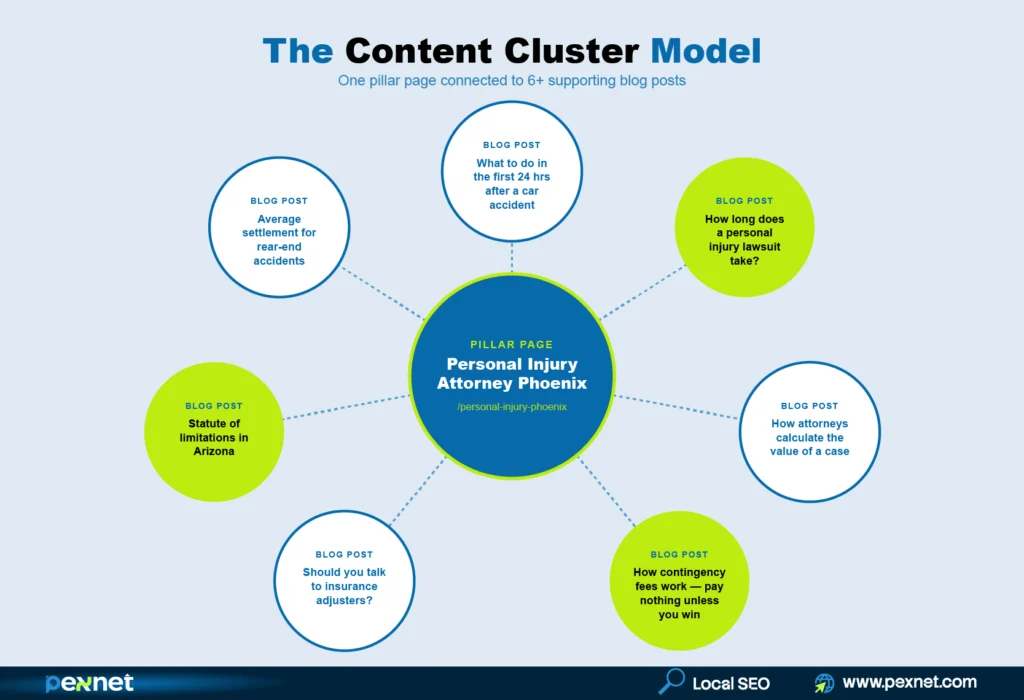
Every practice area page becomes a “pillar” – the main page on that topic. Then you write 5 to 8 blog posts that cover smaller related topics.
Every blog post links back to the pillar practice area page. This is called a “content cluster.”
Here is what clusters look like across different practice areas:
For a Personal Injury pillar page:
- What to do in the first 24 hours after a car accident in [State]
- How long does a personal injury lawsuit take in [State]?
- How attorneys calculate the value of a personal injury case
- How contingency fees work — pay nothing unless you win
For a Family Law pillar page:
- How property is divided in a [State] divorce
- Child custody laws in [State] – what parents need to know
- How long does a divorce take in [State]?
- How child support is calculated in [State]
For a Criminal Defense pillar page:
- What to do if you are arrested in [State]
- DUI vs. DWI in [State] – penalties and differences
- Should you talk to police without an attorney?
- How to expunge a criminal record in [State]
For an Estate Planning pillar page:
- Will vs. living trust – which one do you need?
- What happens if you die without a will in [State]?
- How to avoid probate in [State]
- When should you update your estate plan?
For an Immigration pillar page:
- Green card vs. visa – what is the difference?
- How long does naturalization take in [State]?
- What to do if you receive a deportation notice
- DACA renewal – what you need to know
Step 9: Write Your FAQ Sections So Google’s AI Picks Them
When someone searches Google now, they usually see an AI-generated answer at the very top before any organic result. Google calls this “AI Overviews.”
If your content is structured the right way, your firm will get cited inside that AI answer. If not, you’ll be invisible exactly where your future clients form their first impression.
The good news is, getting cited is mostly about how you format your FAQs.
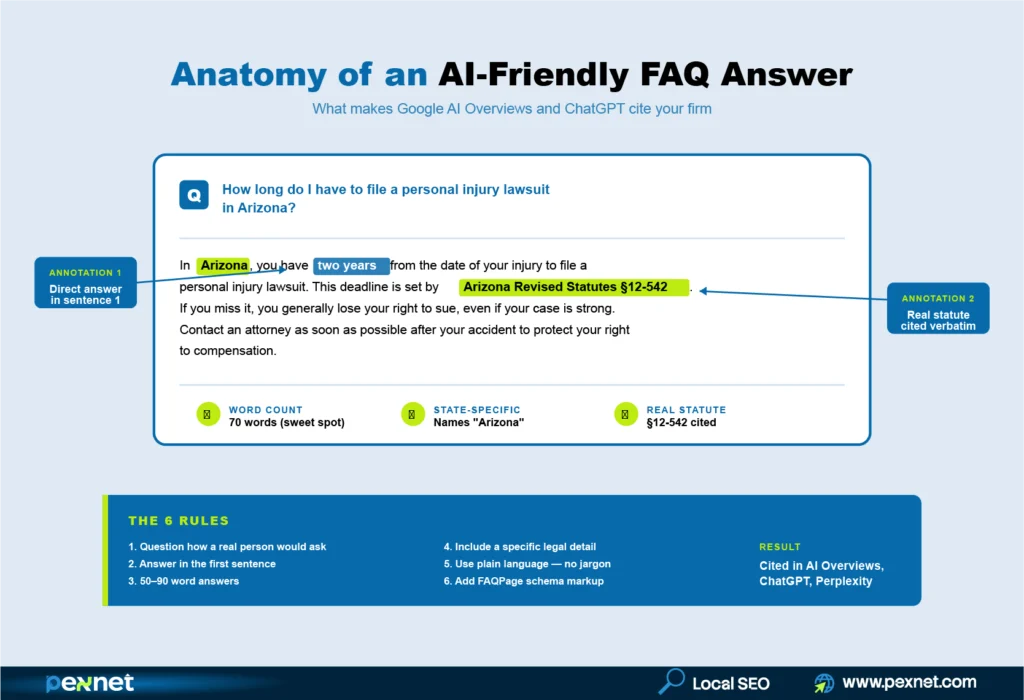
Remember these six rules for FAQs that get cited by AI:
- Write the question the way a normal person would ask it. Not “What is the statute of limitations under [State] tort law?” But “How long do I have to sue for an injury in [State]?”
- Answer in the very first sentence. Do not build up to the answer.
- Keep each answer between 50 and 90 words.
- Include a specific legal detail. Mention your state. Cite the actual statute. Add a real number.
- Use plain language. No legal jargon.
- Ask your web developer to add “FAQPage schema” to every page with a FAQ. This is a piece of code that tells Google clearly that the section is a Q&A.
Here’s a good example of an FAQ that earns AI citations:
“Q: How long do I have to file a personal injury lawsuit in Arizona?
Ans. In Arizona, you have two years from the date of your injury to file a personal injury lawsuit. This deadline is set by Arizona Revised Statutes Section 12-542. If you miss it, you generally lose your right to sue, even if your case is strong. Contact an attorney as soon as possible after your accident to protect your right to compensation.”
As you can see, that answer is 70 words. It starts with the answer, mentions the state, and cites the law.
The same pattern works in every practice area, whether state-specific divorce or criminal defense or estate planning questions.
Step 10: AEO and GEO (Optimizing for AI Answers)
Now we’re going deeper where you have the biggest opportunity for success.
Answer Engine Optimization (AEO) is the practice of structuring content so AI systems like Google’s AI Overviews, ChatGPT, Perplexity, and Claude can pick it up cleanly when they generate answers.
On the other hand, Generative Engine Optimization (GEO) takes it a step further. It is the strategic practice of becoming the source these AI systems consistently reference for queries in your industry and your area.
When someone asks ChatGPT “What is the statute of limitations for a personal injury case in Arizona?” GEO is what makes your firm’s content the source ChatGPT pulls from.
A meaningful share of high-intent legal searches now show an AI Overview before any organic blue link. If your content is not formatted for that surface, much of your potential traffic is being answered before it reaches you.
Our law firm SEOs noticed AEO and GEO come down to these five practices:
1. Lead With a Direct Answer
Open every section, FAQ, and blog post with a clear, one-to-two sentence answer to the question. Then expand.
That’s because AI systems pull these clean lead-in answers first. The Step 7 FAQ format you just read is a textbook example.
2. Use Schema Markup
LocalBusiness, Attorney, LegalService, FAQPage, and Review schema are the basics every law firm site should have.
Article schema for blog posts and HowTo schema for procedural guides like “What to do after a car accident.” Your web developer will add this code, which isn’t optional anymore.
3. Show Real Expertise
That includes author bios with bar admissions, years of experience, and case results.
Add citations to authoritative legal sources like your state bar, the American Bar Association, federal and state statutes, court rules.
Also, use original data when you can produce it (e.g. your firm’s settlement averages, case duration averages, or win rates with the appropriate disclaimers).
Keep in mind that AI engines favor sources that demonstrate deep industry expertise.
4. Cover Topics in Depth
As expected, thin content rarely gets cited.
AI engines prefer sources that comprehensively answer related questions in one place.
A page that answers “What is the statute of limitations for personal injury in Texas?” should also cover what happens if you miss it, what counts as date of injury, and how the discovery rule works.
5. Match Conversational Phrasing
People talk to AI tools more naturally than they Google. A query like “What’s the best family lawyer in Plano for a contested custody case?” is now common. So, your content should reflect how real people ask these questions; not how lawyers write briefs.
The firms that lean into AEO and GEO early in their market tend to build a real lead before competitors catch up. AI search behavior is still settling, which means now is the cheapest time to claim your citation real estate.
Step 11. Zero-Click Optimization
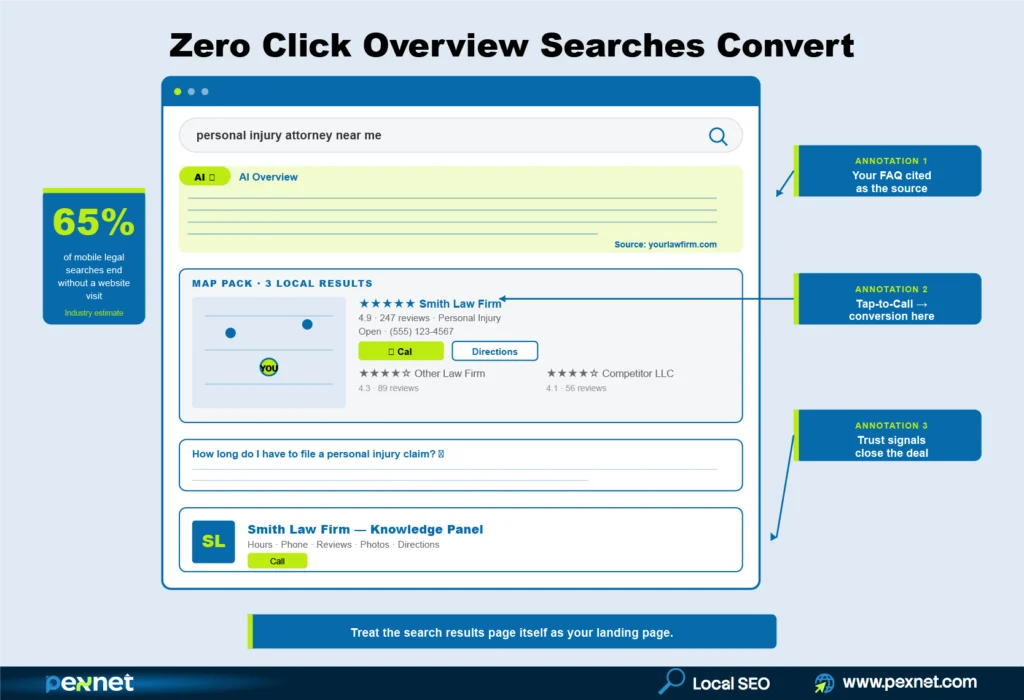
Zero-click results are an opportunity for you to win attention even when the click does not happen.
When someone searches “personal injury attorney near me open now” and Google shows your firm name, hours, reviews, phone number, and a tap-to-call button right inside the result, you have already won!
The client never visited your website, but they called. For a law firm, that is the conversion that matters most.
Zero-click wins come from a few key elements working together:
- A fully populated, regularly updated Google Business Profile with every practice area, every service area, real photos of your office and attorneys, business hours, attributes, and accurate contact information. We’ce covered this in detail in Step 8.
- A steady review velocity and thoughtful review responses that show prominently in the map pack. Pexnet’s SEOs found the firms with 4.7+ stars and recent reviews dominate zero-click visibility.
- FAQ schema that surfaces as expandable answers directly under your search result – sometimes answering the searcher’s question without them clicking through.
- Knowledge panel optimization for branded searches. When someone Googles your firm name, the panel on the right should be complete with your hours, location, photos, attorneys, social profiles, and reviews.
- Strong local pack ranking factors: proximity to the searcher, prominence (your reputation and citations across the web), and relevance (how clearly your GBP and website match the query).
Note: Treat the search results page itself as a landing page. If the searcher never reaches your website, the SERP needs to do the selling; and for legal services where most searches are urgent, the SERP usually does.
Step 12: Set Up and Use Your Google Business Profile Properly
Your GBP is the listing that shows up in the map pack and on the right side of Google search. It’s one of the strongest ranking signals for local search.
Here’s what to do on GBP:
1. Rewrite Your Business Description
Don’t write something like “Smith Law Firm has been serving Phoenix for 20 years, providing quality legal services.”
A strong description includes your practice areas in the first sentence, your geographic service area, what makes you different, and a soft call to action – all in under 60 words.
Here’s a strong GBP description example:
“Smith Law Firm represents injury victims, criminal defendants, and families throughout Phoenix, Scottsdale, and Maricopa County. Specializing in personal injury, car accidents, and DUI defense. Free consultations, 24-hour emergency line, and contingency fee representation – you pay nothing unless we win. Call to schedule your free consultation today.”
2. Post on GBP Every Other Week
GBP has a “posts” feature that deserves your attention because each post signals to Google that your profile is active, and active profiles rank higher.
Here’s what to post:
- Case result updates (with disclaimers)
- Legal updates that affect your practice areas
- “What to do if…” tips
- Seasonal posts (DUI spikes during holidays, divorce filings rise after January, etc.)
- Free guides or resources
3. Seed & Answer the Q&A Section
Your GBP has a Q&A section that anyone (including competitors and random people) can use to ask and answer questions. If you do not seed it yourself, someone else might post wrong information.
So, post 8 to 10 of the most common questions your prospects ask, with your professional answers.
Step 13: Get Reviews
You need reviews to win both Google and people. But before you launch a review campaign, check your state bar’s advertising rules.
Most states allow asking clients for real reviews, but most also require specific disclaimers near testimonials, and most prohibit comparative claims like “best attorney in [city]” unless you have a verifiable award.
Spend 30 minutes reading your state bar’s rules before you start.
Here’s a simple review system that works for our clients:
- After a successful case closes, send the client a thank-you message
- Include a direct link to your Google Business Profile review page
- Make it easy: one click to leave a review
- Respond to every review, positive or negative, professionally
Note: Aim for 2 to 4 new reviews per month because slow and steady wins.
Step 14: Compete With Directories
When you Google any legal service, the top results are usually directories like Avvo, FindLaw, Martindale, Justia, and Super Lawyers.
Since they have huge domain authority built over 15+ years, you will not outrank them on every keyword. But you can beat them where they are weak.
Here’s where directories are weak:
- They cannot reference YOUR specific local courthouse, judges, or local procedures
- They cannot show YOUR real client testimonials with names
- They cannot demonstrate YOUR specific attorney’s experience in detail
- They are rarely updated, so their content goes stale
- They cannot easily win AI Overview citations because their content is generic
If you build the practice area pages and city pages we covered in Steps 3 and 4 (with real local courthouse details, local testimonials, and attorney case results), you will outrank directories on the queries that convert.
Note: keep your profiles on these directories complete and updated. They drive direct referral traffic AND they create citation signals that help your GBP rank.
Step 15: Track What’s Working
Building all this without tracking is like filing motions without checking the outcomes.
Here are five numbers to track every month:
- Phone Calls From Your Website and GBP
Use call tracking: different phone numbers for your website, your GBP, and any directory profiles.
- Consultation Requests by Page
Which practice area pages are generating contact form submissions?
- Map Pack Appearances
Tools like BrightLocal show where you appear in the map pack across a city grid.
- Time on Page & Bounce Rate in Google Analytics
If people leave a page after 5 seconds, the page is not matching what they searched for.
- Keyword Rankings
Track 20 to 30 priority keywords every month.
7 Mistakes That Kill Law Firm SEO
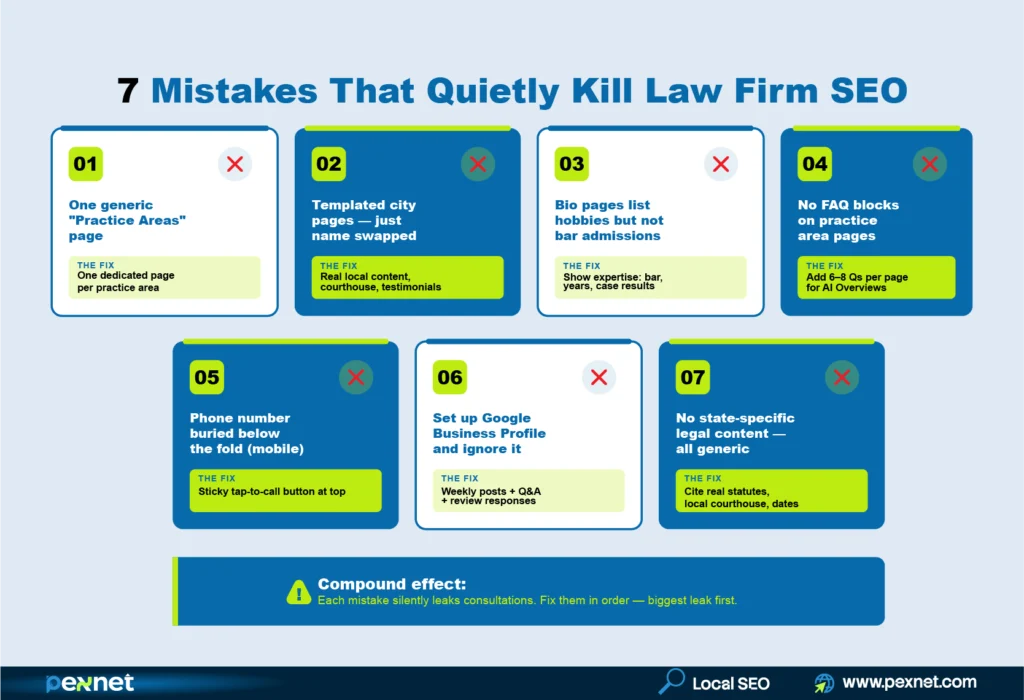
Watch out for these because each one quietly costs you consultations every month.
- One “Practice Areas” page that lists everything. Build one dedicated page per practice area instead.
- Templated city pages with just the city name swapped. Real local content or no city page at all.
- Bio pages that list hobbies but not bar admissions. You are missing the only proof-of-expertise signal that matters.
- No FAQ blocks on practice area pages. You are giving up AI Overview citations and “People Also Ask” rankings.
- Phone number buried below the fold on mobile. Urgency-intent visitors leave in seconds.
- Setting up Google Business Profile and never touching it again. A stale GBP is a ranking-killer. Post weekly.
- No state-specific legal content. Generic content reads like every other firm in the country. Cite your actual state statutes. Mention your local courthouse.
What to Do Next
By now, you can guess your content strategy for your law firm might take time to implement. You probably do not have 20 hours a week to write content, manage GBP, set up tracking, and analyze rankings.
At Pexnet, we specialize in creating local SEO content systems for US law firms. Practice area pages, city pages, attorney bios, content clusters, GBP optimization, AI Overview structuring – the whole framework you just read about, executed by a team that does this every day for legal clients.
If you want to see exactly which gaps are costing your firm consultations right now, we offer a free audit. Then we show you what to fix first.

Md Riadul Islam
Carpet Cleaning SEO Specialist
With over 10 years of experience, Riadul is passionate about helping local, independent businesses succeed.
He’s now focused on AI’s impacts on niche websites since aside from Google, people are also using different AI platforms for carpet cleaning services.
He found that while Google cares about content relevance and website authority, AI relies more on trust and credibility to determine recommendations. That’s why he prioritises strengthening trust signals for our clients.
Riadul believes that sustainable growth comes from combining strong branding, deep customer trust, and smart SEO approaches. At Pexnet, he shares the strategies, frameworks, and real-world lessons he has refined over a decade.
Get Quality Leads from Us
PexNet Newsletter - Subscribe for SEO news, trends, updates, & more.
Share this job post


Related Posts


We’re All Ears!
A simple, open conversation can create new doorways to your professional and business success. Don’t hesitate. Take the first step right now.