Website Traffic But No Leads? | 10 Possible Reasons+DIY Fixes

Restoration SEO
22 May
Last updated: 26 May
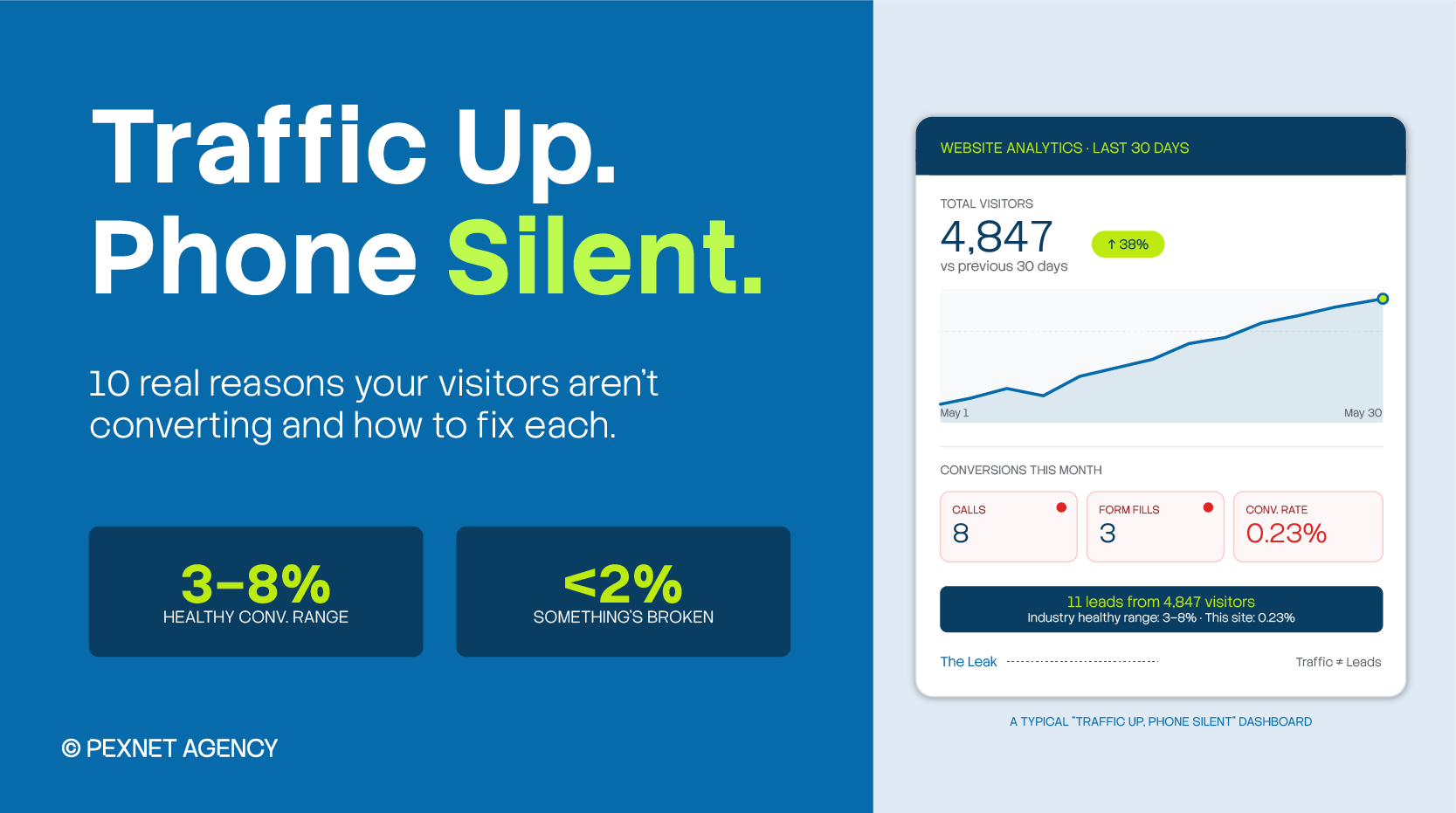
Earning lots of website traffic is half the battle. The real deal is in conversion. After all, what benefit does a high traffic volume have if your revenue doesn’t improve?
Many of our SEO clients have this problem. They have lots of website traffic but no leads. They think more visitors means more sales. So, when reality doesn’t meet their expectations, their world comes crashing down.
If you’ve been there, all hope isn’t lost. You just need to find the reasons behind your poor conversion rate and take steps to fix them.
We created this guide just for you. Here, you’ll find 10 reasons that commonly cause this issue and what you can do about them with or without professional help.
Summary
The most practical visitor-to-lead conversion rates for US-based local service businesses are 3% to 8%, depending on the niche. If yours is below 2%, something is definitely not working.
Why does your website get traffic but no leads? In 9 out of 10 cases we audit at Pexnet, the cause is one of these three:
- Visitors landing on your site are not actually buyers (intent mismatch),
- Your phone number and CTAs are buried or weak, or
- Your site loads too slowly on mobile.
What’s a “Normal” Lead Rate?
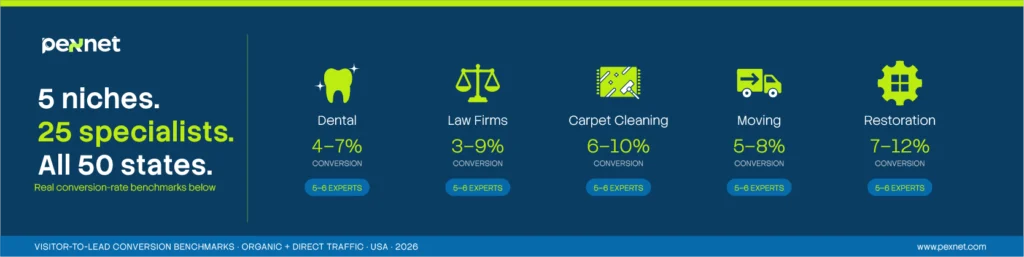
Before you start panicking about your numbers, you need to find out what’s normal and what’s not.
So, we created this guide based on what we see in our clients’ cases.
Here, you’ll see the average lead conversion rates of both organic and direct traffic on different local service websites. For your information, paid ad traffic isn’t included here (which tends to convert higher).
| Our Niches | Visitor-to-Lead Conversion Rate | Common Primary Action |
| Dental Clinics | 4%-7% | Appointment request or click-to-call |
| Law Firms (personal injury) | 5%-9% | Free case review form or call |
| Law Firms (family / criminal / estate) | 3%-6% | Confidential consultation form |
| Carpet Cleaning | 6%-10% | Quote request or click-to-call |
| Moving Companies | 5%-8% | Free binding estimate |
| Restoration (water/fire/mold damage) | 7%-12% | Emergency call (24/7) |
Other Popular US Local Service Niches
Although these numbers are collected from 2026 industry benchmark reports (WebFX, LocaliQ, ClicksGeek), we also took our time to cross-reference them with what we see when auditing similar sites:
| Niche | Visitor-to-Lead Conversion Rate | Notes |
| Emergency Plumbing | 10%-16% | Urgent intent drives the highest rates of any service |
| HVAC (repair) | 6%-10% | Lower in heavy off-seasons; emergency calls help increase conversions |
| HVAC (replacement / install) | 3%-7% | Higher ticket = longer decision = lower rate |
| Roofing | 3%-6% | Insurance-driven; longer sales cycle (30+ days) |
| Electrician | 5%-9% | Mid-urgency, faster decisions |
| House Cleaning / Maid Services | 8%-14% | Recurring revenue + lower price = faster conversions |
| Pest Control | 7%-12% | Strong urgency, especially for rodents/bedbugs |
| Lawn Care / Landscaping | 4%-8% | Seasonal swings, longer comparison shopping |
| Pool Service / Repair | 5%-8% | Peaks in late spring and summer |
| Auto Repair / Body Shop | 4%-7% | Trust-heavy (Reviews carry most of the weight) |
| Auto Detailing | 6%-10% | Quick decision, often book within hours |
| Locksmith (emergency) | 12%-18% | Highest in the local services category – pure urgency |
| Garage Door Repair | 8%-12% | Emergency intent + clear pricing wins |
| Chiropractic | 4%-7% | Free-consult offers lift this significantly |
| Med Spa / Cosmetic | 3%-6% | High ticket, longer research phase |
| Dermatology | 3%-5% | Trust signals (board-certified, before/after) matter most |
| Veterinary Clinics | 5%-8% | Pet emergencies push the top of the range |
| Real Estate Agents | 1%-3% | Long consideration cycle; multiple-touch journey |
| Personal Trainer / Gym | 3%-6% | Free trial offers double this consistently |
| Wedding / Event Photography | 2%-5% | Long lead time, multiple vendors compared |
| Tax Preparation / CPA | 4%-7% | Strong seasonal swing (January–April) |
| Insurance Agents | 2%-5% | Quote-based, heavy comparison shopping |
| Daycare / Preschool | 3%-6% | High-trust decision, in-person tour usually required |
| Tutoring Services | 4%-7% | Free assessment offers move this higher |
| Tree Service | 5%-9% | Emergency tree removal pushes the top of the range |
| Painting (interior / exterior) | 4%-7% | Multi-quote shopping is the norm |
| Junk Removal | 7%-11% | Quick decision, often same-day |
| Solar Installers | 2%-4% | Long cycle, high ticket, very competitive |
If you look carefully into these numbers, you’ll notice a few common patterns:
- Emergency = Higher Conversion
Niches like locksmith, plumbing, restoration, and garage door repair are at the top because the visitor is in pain and needs immediate help.
- High Ticket = Lower Conversion
For solar, roofing, HVAC replacement, and real estate, people usually compare 3-5 providers before they decide. So, they rarely see single-visit conversions.
- Recurring + Low Ticket = The Sweet Spot
Cleaning, pest control, and lawn care usually convert well because the decision is small and fast.
How to Do the Math on Your Own Site
Now, let’s talk about your business.
First, take your total monthly website visitors this way: Google Analytics → Reports → Acquisition → All Users.
Divide your total monthly leads (calls + form submissions) by that number. Then, multiply by 100.
For example, if you’re getting 1,000 visitors and 12 leads, you’re at 1.2%.
That’s a serious problem regardless of the niche.
Website Traffic But No Leads: Why That Happens
For your convenience, we’ve listed our findings the way they show up in our audits. So, you’ll see the common ones first.
1. There’s Intent Mismatch
In other words, you’ve ranked for the searches. This is the most common reason we find.
To give you some idea, a water restoration company in Arizona came to us last year. They were frustrated that they weren’t getting calls even after investing heavily in SEO.
When we looked in their Search Console, we found their highest-traffic page ranked for “how to dry a wet carpet at home.”
So, they were getting free-help traffic, not emergency-service traffic. It was obvious – someone who wanted to dry their carpet with a box fan wasn’t going to pay $4,200 for water extraction.
Here’s how to find it yourself:
- Open Google Search Console → Performance → Queries
- Sort by impressions
- Look at your top 20 queries
If most contain “how to,” “what is,” “DIY,” or “near me without (your service),” you’re dealing with a search intent issue. Buyer-intent searches usually use words like “near me,” “emergency,” “best,” “cost,” “(service) in (city),” or “24/7.”
So, you should build dedicated commercial pages to target buyer-intent keywords.
For a moving company in Denver, these keywords could be: “long distance movers Denver,” “apartment movers Denver,” or “office relocation Denver.”
Buying Keywords vs Informational Keywords
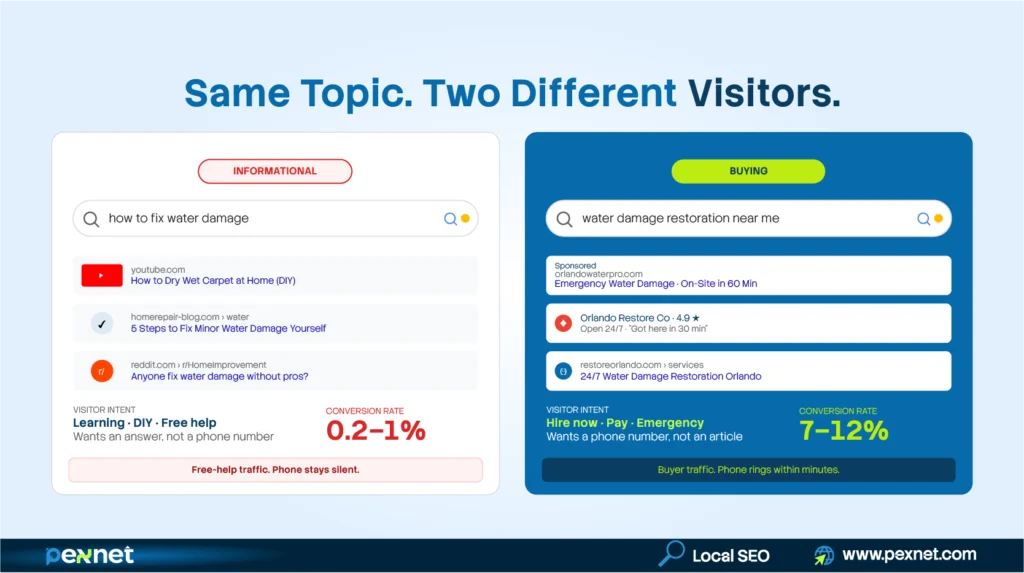
Informational keywords are searches where the visitor is learning, researching, or trying to fix something themselves. On the other hand, buying, commercial, or transactional keywords bring visitors ready to hire, buy, or book.
| Comparison Point | Informational Keyword | Buying Keyword |
| Example query | “how to fix water damage” | “water damage restoration near me” |
| What the visitor wants | A free DIY guide | A company to call now |
| Search intent | Learning | Ready to hire |
| Page type that ranks | Blog post, guide | Service page, location page |
| Average conversion rate | 0.2% – 1% | 7% – 12% |
| Typical session value | Low | High |
| Time to decision | Days to weeks | Minutes to hours |
Here’s how to spot them on your site.
Informational keywords usually start with:
- “how to…”
- “what is…”
- “why does…”
- “best way to…”
- “DIY…”
- “tips for…”
- “(problem) explained”
Buying keywords usually include:
- “near me”
- “(service) in (city)”
- “best (service) (city)”
- “(service) cost / pricing / quote”
- “emergency (service)”
- “hire (service)”
- “(service) open now”
- “24/7 (service)”
Now the question is, should you publish informational content at all?
Yes, but as a strategic approach. Informational blog posts are fine for building topical authority and getting AI search visibility on popular platforms like ChatGPT, Perplexity, and Google’s AI Overviews and AI Mode.
However, don’t let informational pages dominate your traffic while none of your buying-keyword pages are ranking. That’s exactly how you end up with 6,000 monthly visitors and just 10 phone calls.
2. Your Phone Number Is Hidden
This may sound basic but it happens pretty often.
We once audited a dental clinic where the phone number was only on their contact page in 11px gray text with no tel: link. That was literally invisible on a mobile screen.
Remember, click-to-call is one of the highest-converting actions for local service businesses. So, make sure your number appears in:
- The header on every page (using a large, contrasting color)
- A sticky mobile bar while scrolling
- Every CTA section
- The footer
- Wrapped in a <a href=”tel:”> link, always
Note: Always wrap the number in an <a href=”tel:”> link.
3. Your Mobile Speed Takes Ages to Load
Roughly 60% of local searches now come from smartphones in the US.
If your mobile website takes more than 5 seconds to load on a 4G connection, you’ll be losing more than half of your traffic.
Also, since the average website converts just 2.9% of visitors, 97 out of 100 people might leave your site without doing anything.
Here’s our quick 60-second test:
Run your homepage through Google PageSpeed Insights. If you scored below 50, fix this immediately.
We usually see issues like uncompressed images, builder plugins, auto-playing video, and chat widgets and analytics scripts loading before the main content.
4. Your Homepage Fails the 5-Second Test
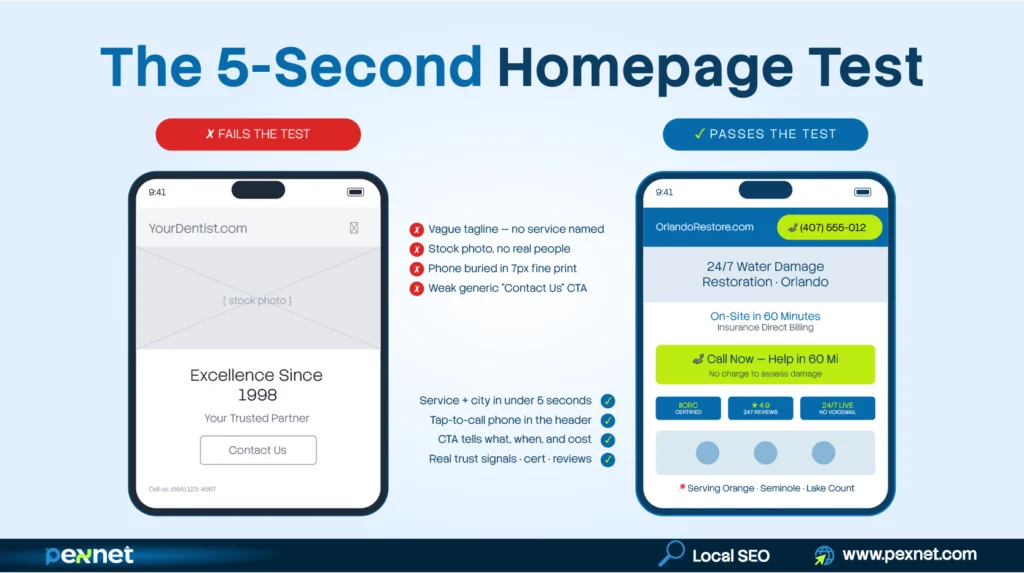
Try this quick test:
Pick someone to show your homepage who’s never seen it before.
First, cover it. Then uncover for 5 seconds. Then cover again.
Now, ask them:
- What does my business do?
- Who do I help?
- How do you get in touch with me?
If they can’t answer these three questions confidently, there’s room for improvement.
We’re tired of seeing hero headlines like “Excellence Since 1998” or “Your Trusted Partner” every week.
Now compare them to:
- “24/7 Water Damage Restoration in Orlando – On-Site in 60 Minutes”
- “Same-Day Emergency Dental Care in Chicago – Walk-Ins Welcome”
- “Licensed & Insured Long-Distance Movers in Atlanta – Free Binding Estimate”
You know which format is better and why.
5. Your Contact Form Has Too Many Fields
Did you know every extra form field cuts your completion rate?
A Hubspot study found that reducing 3 to 4 form fields helps increase conversion rates significantly.
For example, a quote-request form needs four things and nothing more:
- Name
- Phone or email (let the visitor pick which to give)
- Service or issue (dropdown – not free text)
- Zip code or city
That’s it.
You can keep the rest like Address, square footage, “how did you hear about us,” and mailing-list opt-in for the follow-up call. For now, worry about starting the conversation.
6. Your Site Has Poor Trust Signals
Trust signals matter not just for AI SEO but also to earn people’s trust. Your client feedback and reviews, brand mentions in other authority platforms, Google Business Profile – all matter today. That’s because people want to trust you before they decide to contact you.
To give you a clear idea, here are the trust signals that help make a difference for niches we work in:
- Dental clinics: Real team photos with names, ADA membership, financing options visible, recent Google reviews, and before/after photos for cosmetic work
- Law firms: Bar admissions, case results with dollar amounts, attorney bios with credentials, and media features (Avvo, Super Lawyers, local press)
- Carpet cleaning: IICRC certification badge, real before/after photos, recent Google reviews with neighborhood names, and equipment photos
- Moving companies: USDOT and MC numbers visible, BBB rating, real truck photos with company branding, and binding-estimate guarantee
- Restoration: IICRC certification, insurance-direct billing badge, response-time guarantee, and 24/7 dispatch promise
Note: common trust signals like stock photos or “100% satisfaction” badges are literally useless now.
7. Your CTAs Are Soft, Vague, or Hard to Find
The days of “Contact Us” CTAs are long gone. Take a look at their better versions:
- “Get My Free Move Quote – Takes 2 Minutes”
- “Talk to an Attorney in the Next 24 Hours – No Charge”
- “Book My Cleaning – Available This Saturday”
Your CTA should tell the visitor: a) what they get, b) how long it takes, and c) what it costs.
Note: Every page should have at least two CTAs above the fold and another at the bottom.
8. You’re Sending Ad Traffic to the Wrong Pages
The worst approach is paying for Google or Facebook ads and sending those clicks directly to your homepage.
Just think about it: someone who clicked an ad for “emergency plumber 24/7“ should land on a page about emergency plumbing. They’re not expecting a homepage listing water heaters, drain cleaning, remodeling, and the owner’s lovely dog.
So, it’s vital that you match the landing page to the search intent. In many cases, we’ve seen single-focus landing pages helped increase the paid conversion rates of our clients by 2x to 4x.
9. Nobody’s Tracking the Patient Calls You’re Getting
This is the most surprising audit result we hand back to some small business owners.
When they connected with us because they had very few leads, we installed call tracking after finding out their website was well-optimized.
A few weeks later, we noticed they missed half of their calls while their voicemails were left unchecked for many days.
So, the problem was they had no systematic, professional method to handle incoming patients calls and queries.
Here’s what you should track:
- Call tracking on the main number
- GA4 events for form submissions and tap-to-call clicks
- Missed-call alerts that text the owner within 30 seconds
- A simple log of how long it takes to call leads back
10. Your Site Has No Local Signals
This is a Generative Engine Optimization (GEO) Problem. Just mentioning something like “we serve the Greater Chicago area” isn’t enough.
Without enough location-specific content, Google will be confused about your exact location. And things will be worse if you’re a multi-location business.
Here’s what we add for our clients:
- City + state in the page title and H1 of every service page.
- An embedded Google Map on the contact page.
- NAP (name, address, phone) consistent everywhere (exactly matching your Google Business Profile).
- Dedicated service-area pages (SAPs) for every single city or neighborhood you serve
- Schema markup: LocalBusiness, Service, FAQPage (the last one might help with AI Overview citations).
- Real neighborhood names in your body copy e.g. “we serve Lincoln Park, Wicker Park, and Logan Square”.
What to Fix First
You may not have enough time or budget to redo everything at once. In such cases, we recommend this order for our clients:
- Install a call and form tracking app first.
- Make the phone number unmissable on every page, header, and mobile menu.
- Audit your top 5 traffic pages for intent. Realign or rewrite where necessary.
- Shorten the contact forms to 4 fields max.
- Add 5 recent Google reviews to the homepage and top service pages.
- Fix your mobile speed and take it under 3 seconds.
- Rewrite the hero section to pass the 5-second test.
- Strengthen your CTAs with specific, benefit-focused language.
- Set up missed-call text-back and form auto-responders.
- Add LocalBusiness + FAQ schema for AI search visibility.
Your Next Step
If you’re having lots of website traffic but no leads, you can be sure this is a conversion issue.
The good news is, conversion problems are usually cheaper and faster to fix than traffic problems.
At Pexnet, our niche-specific SEOs can help fix this problem. We’ll tell you which of these issues are costing you precious leads and what to do about it.
Feel free to book a free 30-min consultation with us.,

Md Riadul Islam
Carpet Cleaning SEO Specialist
With over 10 years of experience, Riadul is passionate about helping local, independent businesses succeed.
He’s now focused on AI’s impacts on niche websites since aside from Google, people are also using different AI platforms for carpet cleaning services.
He found that while Google cares about content relevance and website authority, AI relies more on trust and credibility to determine recommendations. That’s why he prioritises strengthening trust signals for our clients.
Riadul believes that sustainable growth comes from combining strong branding, deep customer trust, and smart SEO approaches. At Pexnet, he shares the strategies, frameworks, and real-world lessons he has refined over a decade.
Get Quality Leads from Us
PexNet Newsletter - Subscribe for SEO news, trends, updates, & more.
Share this job post


Related Posts

We’re All Ears!
A simple, open conversation can create new doorways to your professional and business success. Don’t hesitate. Take the first step right now.